Qwiktest Smart Assist
Smart Assist: paste a paper, fixed in one tap.
Qwiktest Smart Assist is a free, built-in helper in the Qwiktest question builder that turns pasted or typed questions into clean, exam-ready questions in one tap. It formats maths, physics and chemistry, reads answer keys, splits options, keeps code spacing and tags each topic. It runs on simple rules in your browser, so it is instant, unlimited and uses no AI credits.
Free and unlimited. Runs on your device. No AI credits.
Last updated
Smart Assist at a glance
- Price
- Free on every Qwiktest plan, including Free
- Limits
- Unlimited fixes
- Uses AI?
- No. Simple rules in your browser, so it is instant
- Paste a whole paper
- Up to 200 questions in one paste
- Missing answers
- Tick them, or ask AI to suggest one; you confirm each (AI credits)
- Made for
- JEE, NEET, UPSC, SSC, banking, school and college tests, coding and hiring
- Where
- Any test → Questions → Paste questions, or Add question
Qwiktest Smart Assist in 27 seconds
Paste a whole question paper into Qwiktest, see every question split out with its answer key, then fix formulas, answers and topic tags with one tap. Free, unlimited, no AI credits.
What it fixes
| Subject | You type or paste | Smart Assist makes it |
|---|---|---|
| Maths | x^2 + sqrt(2) = 1/2 | x² + √2 = ½ as a formula |
| Physics | 3 x 10^8 m/s, sin 30° | 3 × 10⁸ m/s, sin 30° as formulas |
| Chemistry | H2SO4, CH4 + 2O2 -> CO2 | H₂SO₄ and the reaction with arrows |
| Biology | Homo sapiens, Tt x tt | Homo sapiens and Tt × tt in italics |
| Match the following | Column I (a)… Column II (i)… | A two-column table |
| Coding | for i in range(3): print(i) | A Python code block with its spacing |
| UPSC statements | 1. … 2. … 3. … is/are correct? | Options like “1 and 2 only” |
| Answer lines | Answer: B, Ans: (a) and (c) | The right options ticked |
| Numerical | Answer: 19.6 m | A numerical question, answer 19.6, unit m |
| Clean-up | Q12. … A) Neon B) Iron · Rs. 500 | Number removed, options split, ₹500 |
Paste a whole paper
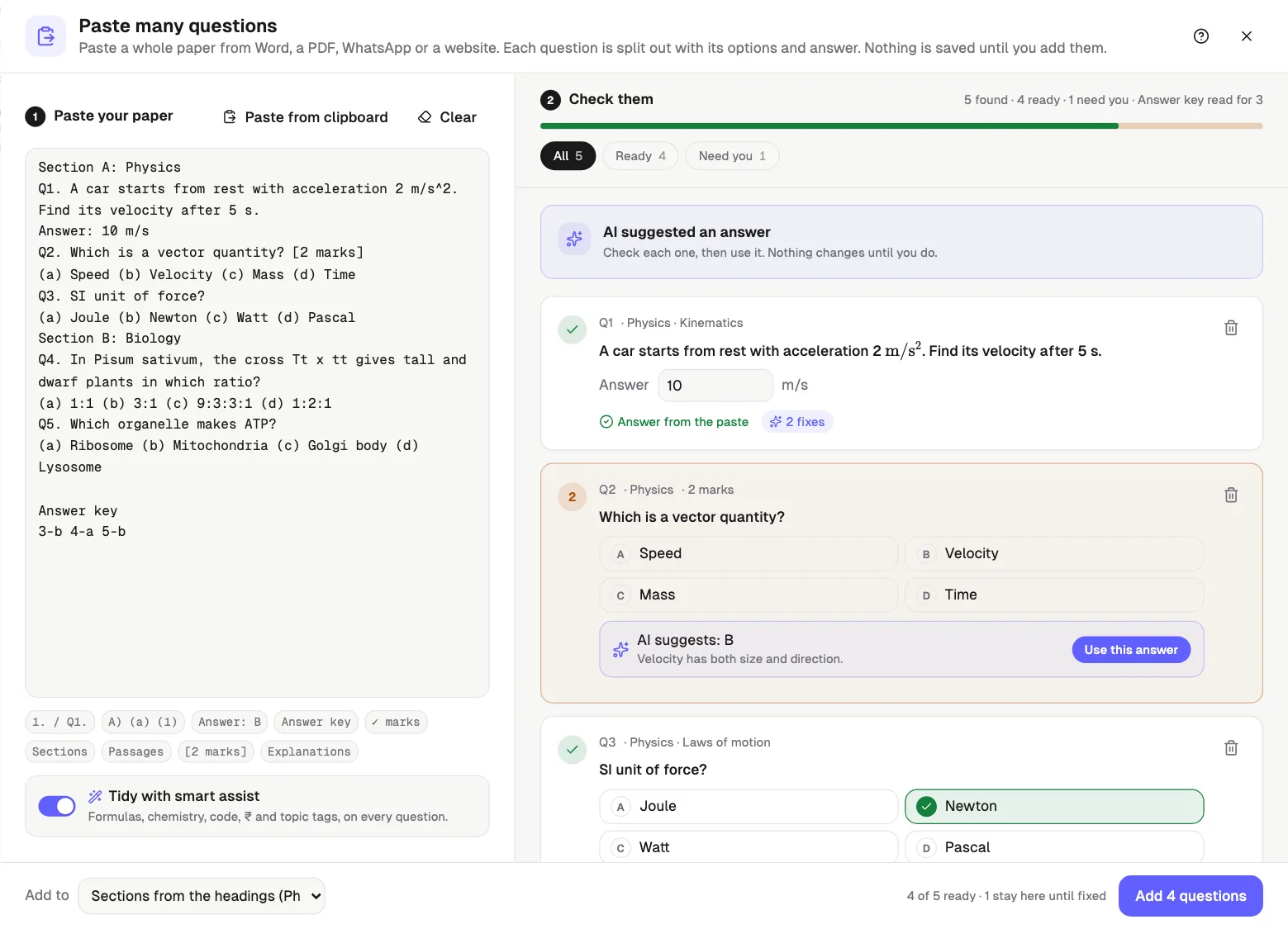
Copy from Word, a PDF, WhatsApp or a website and paste up to 200 questions at once. Smart Assist reads:
- 1., 1), Q1. and Question 1 numbering
- A) (a) A. (1) options, on one line or one per line
- “Answer: B” lines, ✓ or * marked options
- An answer key at the end, like 1-B 2-C or 1 (b) 2 (c)
- Section headings such as Section A: Physics
- Directions (1–5) passages, attached to those questions
- Marks like [2 marks] or (+4, −1), and Explanation lines
How to use Smart Assist
Open your test
In Qwiktest, open any test and go to Questions.
Paste your questions
Tap Paste questions and paste a whole paper, or tap Add question and paste one.
Tap Fix all
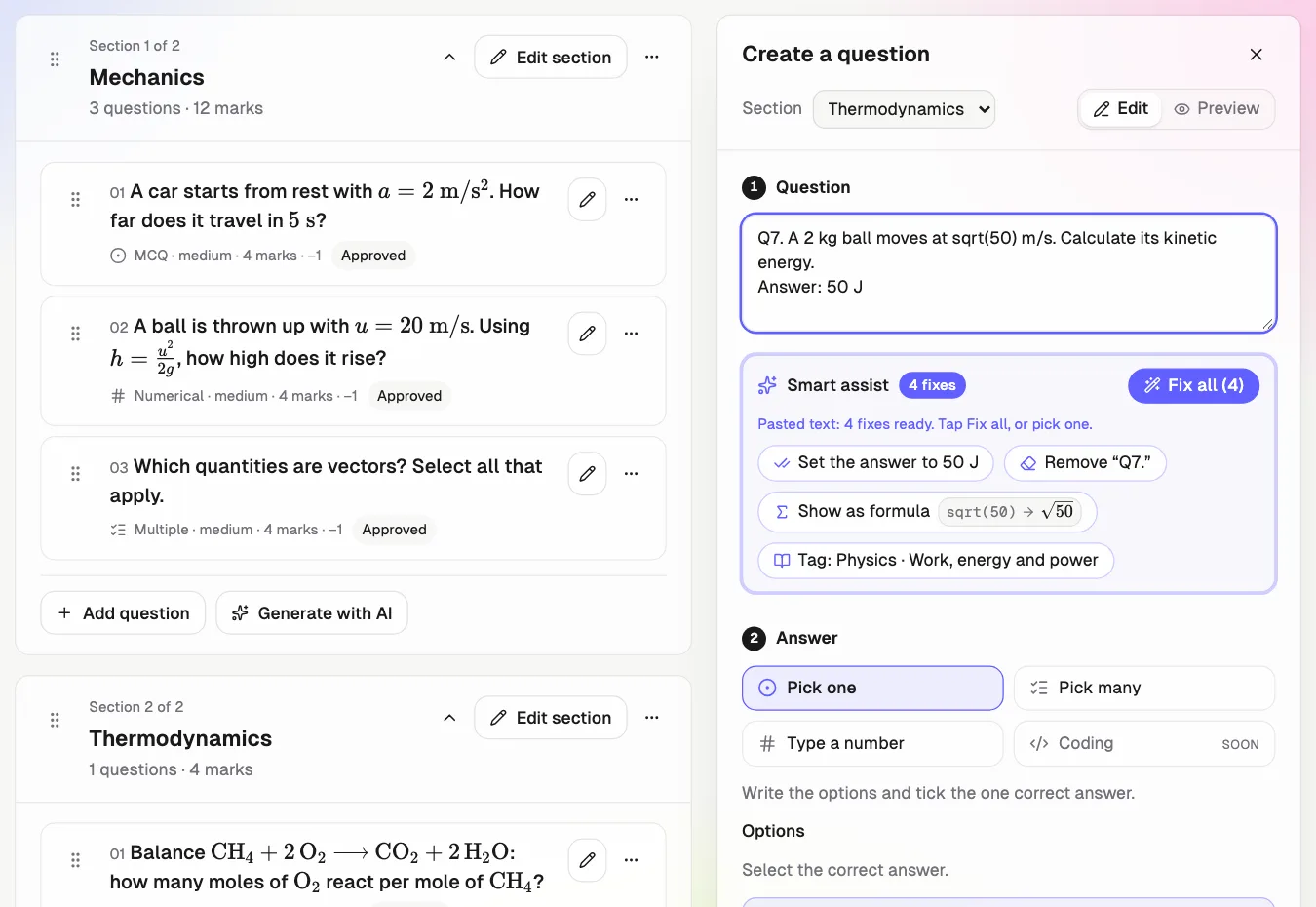
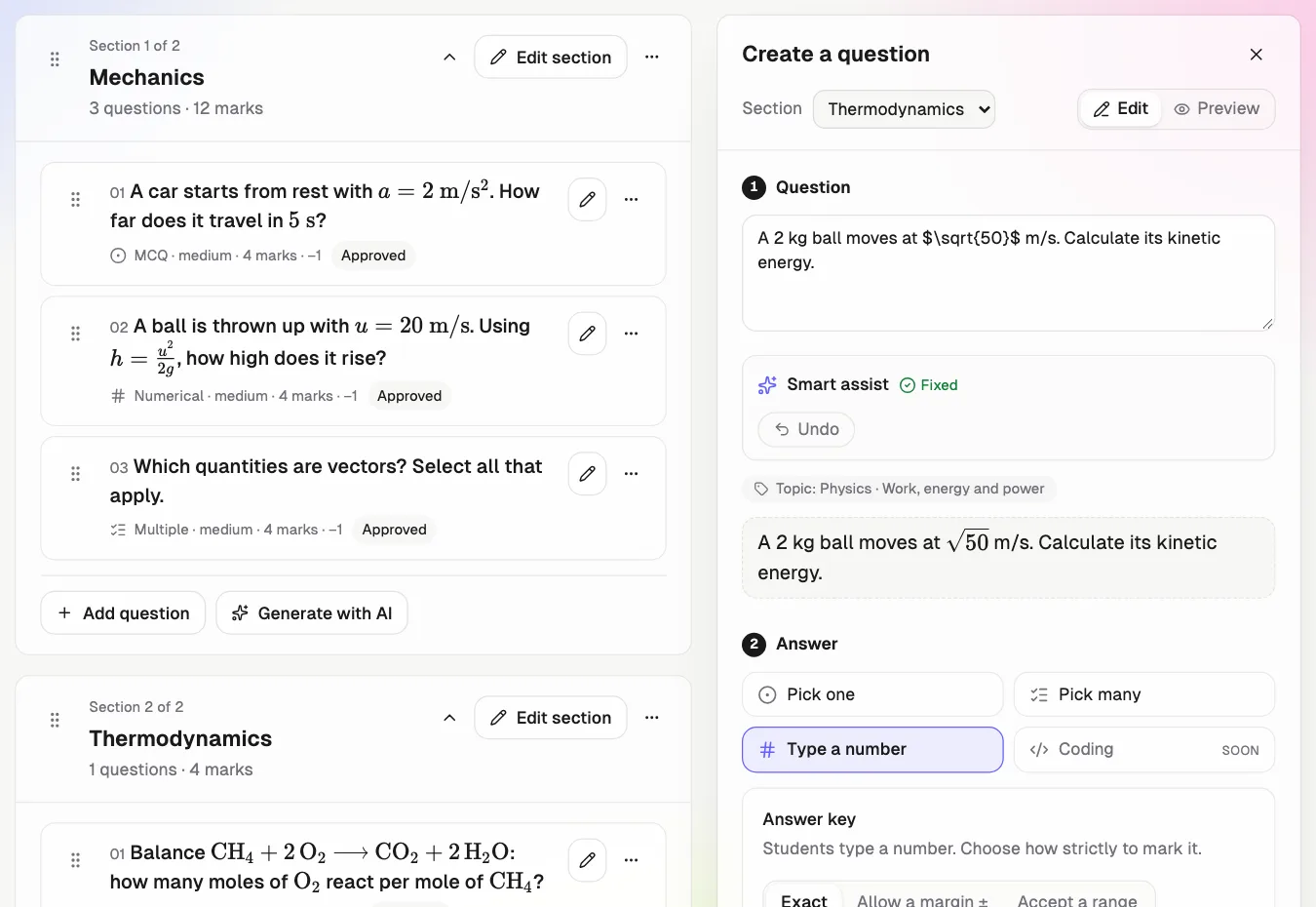
Smart Assist shows every fix before you tap. Fix all applies them; Undo puts them back.
Check and add
Green questions are ready. Tick any missing answer, then add them to your sections.
Smart Assist questions
What is Qwiktest Smart Assist?
Smart Assist is a free helper inside the Qwiktest question builder. When you type or paste questions, it suggests one-tap fixes: formulas, chemical equations, answer keys, options, code blocks, ₹ amounts and topic tags. Fix all applies everything and Undo restores it.
Is Smart Assist free?
Yes. Smart Assist is free and unlimited on every Qwiktest plan, including the Free plan. It uses no AI credits. Only the optional Ask AI button, which suggests a missing answer, uses AI credits.
Does Smart Assist use AI?
No. Smart Assist runs on simple rules in your browser, so it is instant and works the same way every time. It never marks students. Optional AI only suggests a missing answer, and you confirm it before anything is saved.
How do I paste a whole question paper into Qwiktest?
Open a test, go to Questions and tap Paste questions. Paste up to 200 questions from Word, a PDF, WhatsApp or a website. Qwiktest splits each question with its options, answer, section and marks. Fix anything flagged, choose sections, and tap Add.
What if my paper has no answer key?
Questions without an answer are flagged and stay in the paste until you fix them. Tap the right option on each card, or tap Ask AI to suggest answers. AI uses credits, and you confirm every answer.
Which formats does Smart Assist understand?
1. and Q1. numbering; A) (a) and (1) options; Answer: B lines; ✓ marks; answer keys like 1-B 2-C; section headings; Directions passages; marks; explanations; maths like x^2 and sqrt(2); chemistry like H2SO4; Python, C, Java and SQL code; and Rs. amounts.
Does Smart Assist work for JEE, NEET, UPSC and coding tests?
Yes. It formats JEE maths and numerical answers, NEET biology names and match-the-following tables, UPSC numbered-statement options and spot-the-error questions, and code for programming and placement tests. It also tags each question by subject and topic.
Does Smart Assist change my questions without asking?
No. Every fix is a suggestion with a before and after preview. Nothing changes until you tap it or tap Fix all, and Undo puts everything back.